



The HubSpot Prospecting Agent is an AI-powered tool inside HubSpot's Breeze Agents suite that researches prospects, drafts personalized outreach, and surfaces recommended next actions for sales reps. But the feature itself is secondary. What determines whether the HubSpot Prospecting Agent delivers pipeline value is the CRM data architecture, enrollment logic, and workflow governance already in place before you turn it on. Teams that skip that foundation do not just see underwhelming results. They automate bad outreach at scale.
What is the HubSpot Prospecting Agent and Where Does It Fit?
The HubSpot Prospecting Agent is one of several purpose-built AI agents inside HubSpot's Breeze product suite, introduced in 2024. Breeze AI consists of three layers: Breeze Copilot (an AI assistant embedded across HubSpot), Breeze Intelligence (data enrichment and buyer intent), and Breeze Agents (autonomous, multi-step task execution). The Prospecting Agent lives in that third layer, built specifically to support outbound and inbound sales workflows inside Sales Hub.
Where Breeze Copilot acts as an always-on assistant that answers questions and drafts content on demand, the Prospecting Agent operates more autonomously. It researches target accounts using data available in HubSpot and connected sources, generates personalized outreach drafts, and helps reps prioritize their time against active pipeline. The distinction matters because the agent's output quality is directly dependent on the quality of data it can access inside your CRM.
What Does the HubSpot Prospecting Agent Do for Sales Teams?
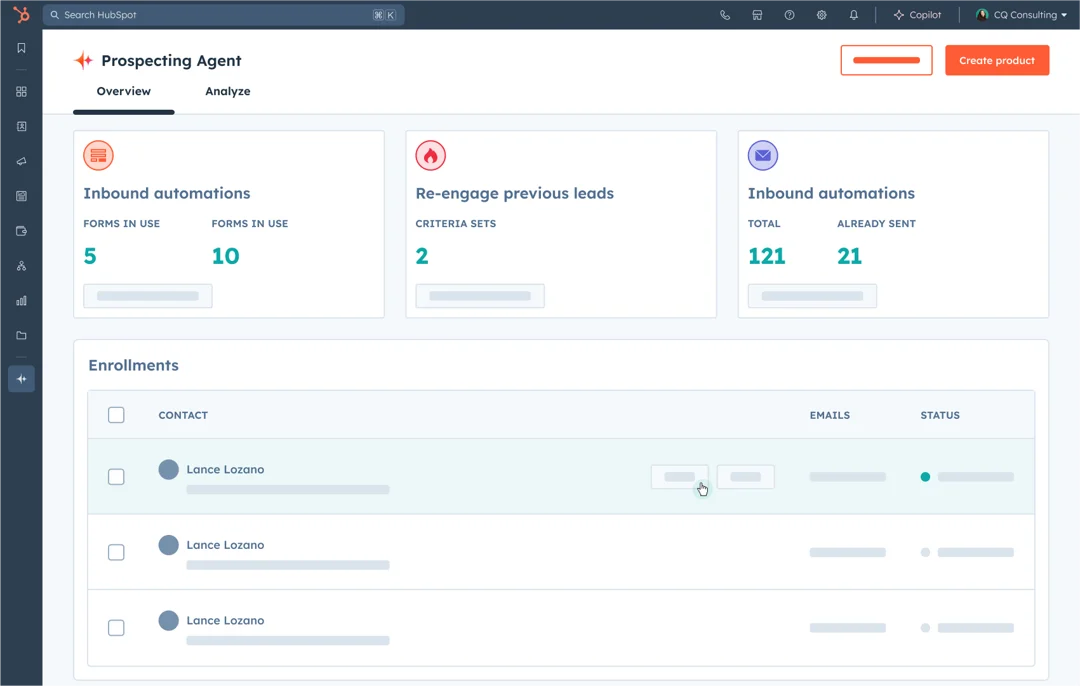
At its core, the Prospecting Agent is designed to reduce the manual research burden on sales reps. Instead of a rep spending time profiling a contact before writing an outreach email, the agent pulls available context from HubSpot, including contact properties, company data, engagement history, and enrichment from Breeze Intelligence, and produces a personalized draft the rep can review and send.
The agent also surfaces recommended next actions aligned to each rep's open prospects, helping prioritize who to reach out to and when. For SDR teams running high-volume outbound, this compresses the prospecting cycle. For account executives working a defined list, it surfaces context that makes every touchpoint more relevant.
Capabilities the Prospecting Agent supports include:
- Automated prospect research using CRM data and enrichment
- Personalized outreach draft generation based on contact and company context
- Recommended next actions surfaced per rep view
- Integration with HubSpot sequences for structured follow-up
- Activity logging aligned to pipeline stage
- Intent signal monitoring, including page views, form submissions, and CRM interactions
Note: HubSpot continues to iterate on Breeze Agent capabilities. Always verify the current feature set against HubSpot's official product documentation before making purchasing or configuration decisions.
Which HubSpot Plan Includes the Prospecting Agent?
The Prospecting Agent is available within Sales Hub and is generally tied to higher-tier plans. As of 2026, AI agent features including the Prospecting Agent have been associated with Sales Hub Professional and Enterprise tiers, with seat-level availability varying by plan. Breeze Intelligence credits, which power the enrichment and intent data that feed the agent, are separately allocated or purchased.
Before enabling this feature for your team, confirm your current Sales Hub tier, check what Breeze Intelligence credits are available on your plan, and verify whether there are per-seat or per-usage restrictions. Working with a HubSpot solutions partner to audit your license configuration before building out the agent workflow prevents downstream frustration when rollout scales.
What Has to Be True Before the Prospecting Agent Delivers Results?
This is where most teams run into trouble. The Prospecting Agent does not create good data. It uses whatever data is already in your CRM. If contact records are incomplete, company properties are inconsistent, or lifecycle stages are unreliable, the agent will surface and prioritize the wrong prospects with high confidence.
| The agent reflects your data, not your intent. Bad CRM hygiene produces bad AI output, at scale and automatically. |
Three conditions must be true before the Prospecting Agent will deliver meaningful results:
- Clean, standardized CRM data across contact and company records
- A defined ICP with criteria mapped to actual HubSpot properties
- Clear enrollment logic that tells the agent which records to act on and when
This is exactly the work that preceded automation for one global logistics provider we worked with. Before any AI agent could run reliably, the team had to unify CRM data across systems, standardize contact and company properties, and validate workflows with more than 20 pilot users. The result was 100% of RFP workflows automated inside HubSpot, with 15-minute syncs keeping data current in real time. The Prospecting Agent was not the starting point. Clean, unified CRM data was.
How to Use the HubSpot Prospecting Agent Strategically
The Prospecting Agent works best when embedded in a larger GTM system, not treated as a standalone feature. Here is how to apply it by role:
- BDRs and SDRs: Use scoring to prioritize daily tasks and automate follow-ups to high-fit leads.
- RevOps: Define fit and intent signals, monitor performance, and feed insights back into scoring logic.
- Marketing: Build campaigns that align to the segments the agent prioritizes, improving conversion and velocity.
Personalization is what makes agent-driven outreach effective. The Prospecting Agent researches each target company and contact, using that information to craft tailored emails that speak to the prospect's context. For example, if you are selling a B2B software solution, the agent might incorporate a potential client's recent product launch or funding activity into the outreach draft, making the message feel relevant rather than templated.
The agent also monitors intent signals, including repeated pricing page visits, content downloads, and CRM interactions, and can trigger outreach at the moment a prospect is most likely to engage. This timing advantage is significant for teams that have historically relied on manual rep judgment to determine when to follow up.
Autonomous Vs. Supervised: How Should You Run the Agent?
One of the most consequential configuration decisions teams face is how much autonomy to grant the Prospecting Agent. There is no universally correct answer. The right model depends on your data quality, your rep workflows, and your risk tolerance for outbound errors reaching prospects.
| Decision Area | Supervised Mode | Autonomous Mode |
|---|---|---|
| Email approval | Rep reviews before send | Agent sends automatically |
| Best for | New deployments, lower data confidence | Mature CRM data, trusted ICP filters |
| Risk profile | Lower, more rep time required | Higher, requires governance controls |
| Personalization quality | Rep can adjust drafts | Fully dependent on CRM data quality |
| Scale potential | Limited by rep bandwidth | High, but errors scale too |
Designing explicit permission layers for what the agent can do autonomously versus what requires rep approval is a governance decision, not a technical afterthought. Teams that treat it as a setting to toggle rather than a policy to define tend to lose rep trust in the agent quickly, often because a poorly timed or off-target email reaches a priority account.
What Are the Most Common Setup Mistakes?
The biggest misconception is treating AI lead scoring like a set-it-and-forget-it engine. Many teams activate the Prospecting Agent without aligning scoring logic to their ICP, verifying data cleanliness, or syncing it with rep workflows and sequences. The results are predictable:
- Scoring models overvalue email opens and underweight firmographics
- Teams use the agent to rank leads but never update sequences to reflect those rankings
- Sales ignores the scores because they do not trust the logic behind them
The agent is only as good as the system behind it, especially when reps are the end users whose adoption determines whether it sticks.
Tactical Setup Steps for HubSpot Prospecting Agent
- Define Your ICP in HubSpot: Set scoring criteria using lifecycle stage, industry, tech stack, and company size before touching any agent settings.
- Clean Your CRM Fields: Remove conflicting or outdated data from contact and company records. Standardize property values across your database.
- Align Scoring With Sequences: Use workflows to enroll high-fit leads into rep cadences automatically so scores translate into action.
- Review Scoring Outcomes Weekly: Spot false positives early and refine logic before patterns solidify.
- Pair With Buyer Intent Data If Possible: Integrate tools like Bombora or website engagement scoring to strengthen signal quality.
- Design Governance Before Go-live: Decide which actions the agent takes autonomously and which require rep approval. Document the logic so it can be audited.
For teams coming from fragmented CRM environments, including those migrating from Pardot, Salesforce, or a combination of disconnected tools, the consolidation work required before agent deployment is substantial. Consolidating data into a unified HubSpot system and building automated lead lifecycle workflows is a prerequisite, not a parallel workstream. You can learn more about how AI content workflows follow the same prerequisite logic when building out a full Breeze AI stack.
When Does Working With a HubSpot Partner Make More Sense Than DIY?
For teams with clean CRM data, a well-defined ICP, and existing workflow infrastructure, self-configuration is viable. The HubSpot documentation covers the mechanics of enabling the agent, and teams with RevOps capacity can work through setup iteratively.
The case for a HubSpot partner becomes clearer when any of the following are true:
- CRM data is fragmented across multiple systems or has not been audited in more than a year
- ICP criteria exist in a deck or spreadsheet but are not mapped to HubSpot properties
- Sequences and workflows are not currently tied to scoring logic
- The team lacks RevOps capacity to build, test, and iterate on agent configuration
- A previous AI or automation rollout lost rep trust and needs to be rebuilt
Partners operate at the layer the Prospecting Agent depends on: CRM architecture, data governance, and workflow design. The agent configuration itself is often the last step, not the first.
Frequently Asked Questions
Q: What is the HubSpot Prospecting Agent?
A: The HubSpot Prospecting Agent is an AI agent inside HubSpot's Breeze AI suite that automates prospect research, generates personalized outreach drafts, and surfaces recommended next actions for sales reps. It operates within Sales Hub and draws on CRM data, company properties, and Breeze Intelligence enrichment to prioritize outbound activity.
Q: How Do I Set up the HubSpot Prospecting Agent?
A: Setup starts before you touch the agent itself. You need clean, standardized CRM data, a defined ICP mapped to HubSpot contact and company properties, and enrollment logic that tells the agent which records to act on. From there, you configure scoring criteria, connect sequences, and decide whether the agent operates autonomously or requires rep approval before sending.
Q: Which HubSpot Plan Includes the Prospecting Agent?
A: The Prospecting Agent is available on Sales Hub Professional and Enterprise tiers as of 2026, with Breeze Intelligence credits allocated separately. HubSpot's packaging for AI features continues to evolve, so confirm your current plan's feature set and credit allocation before building out an agent workflow.
Q: How is HubSpot AI Lead Scoring Different From Manual Lead Scoring?
A: Manual lead scoring requires a RevOps team to define criteria, assign weights, and update the model periodically. HubSpot AI lead scoring, powered by Breeze AI, analyzes contact and company data dynamically to surface fit and intent signals without requiring constant manual recalibration. The tradeoff is that the AI model reflects whatever data is in your CRM, so data quality has a direct and immediate effect on scoring accuracy.
Q: What is the Biggest Mistake Teams Make With the HubSpot Prospecting Agent?
A: Activating the agent before the CRM foundation is ready. Teams that turn on the Prospecting Agent with incomplete contact data, undefined ICP criteria, or disconnected sequences do not just get poor results. They automate poor outreach at volume, which can damage sender reputation and erode rep trust in the tool entirely.
The Agent is Only as Good as What is Underneath It
The HubSpot Prospecting Agent is a powerful capability. But every team that has seen it work at scale built something first: clean data, defined ICP filters, governance over what the agent can do without a human in the loop, and workflow logic that connects scores to rep action. The agent did not create that foundation. It inherited it.
If your team is evaluating the Prospecting Agent, the right first question is not which features to enable. It is whether your CRM is ready to support what the agent needs to do its job.
To see how Prospecting Agent fits inside a broader AI strategy for your CRM, explore our AI for HubSpot services.
Ready to build the foundation your Prospecting Agent needs? Talk with our team.