.png?width=552&height=88&name=aptitude8%20-%20standard%20-%20White%20-%20LG%20(1).png "aptitude8 - standard - White - LG (1)")
.png?width=750&height=405&name=Building%20a%20Scalable%20HubSpot%20Strategy%20(2).png)


The Challenge
Organizations managing multiple HubSpot portals often struggle to get a clear picture of performance across all of them. Leaders and analysts frequently need to log into multiple accounts, pull reports manually, and compile fragmented data just to produce a single update. This process slows down reporting and makes it harder to quickly identify pipeline risks, revenue trends, and growth opportunities across environments.
What It Is
Aggreg8 is an application that unifies HubSpot data from multiple portals into a single view. Built for private equity firms, franchise organizations, and any team managing more than one HubSpot portal, it enables users to monitor revenue, pipeline, and growth metrics across environments without switching between portals.
Unlike traditional integrations or data warehouses, Aggreg8 does not store or replicate data. Instead, it securely pulls live information from connected portals, providing real-time visibility with minimal setup.
Key Characteristics:
- High-level portfolio data aggregator
- Connects multiple HubSpot portals into one view
- No data storage or replication
- Fast setup with minimal configuration
- Live visibility into portfolio performance
Onboarding
Getting started takes about two minutes. Invite your team members, connect your HubSpot portals via OAuth, and Aggreg8 immediately begins pulling live data across all environments. No infrastructure required, no technical setup.
Requirements
- HubSpot login access to each portal
- Authorization to connect those portals
Out of the Box Reports
Reference for each reporting page in Aggreg8. All reports pull live data from your connected HubSpot portals and respect your current filter selections.
Overview Dashboard
The overview dashboard is your landing page after login. It provides a high-level snapshot of portfolio performance.
Key Performance Indicators:
- Total deals created and closed across all portals
- Total and average revenue
- Overall win rate
- Active pipeline value
Charts:
- Performance Over Time — Revenue and deal count trended by your selected grouping (monthly, quarterly, yearly)
- Portal Comparison — Side-by-side bar chart comparing key metrics across portals
Deals
Detailed deal reporting across your portfolio.
Metrics:
- Deals created vs. closed over time
- Win rate trends
- Average deal size
- Deal velocity (average days to close)
Charts:
- Deal Creation — Stacked area chart of new deals over time, broken down by portal
- Closed Deals — Closed-won deals trended over time
- Win Rate — Line chart of win rate percentage over time
- Deal Funnel — Funnel visualization showing deals at each pipeline stage
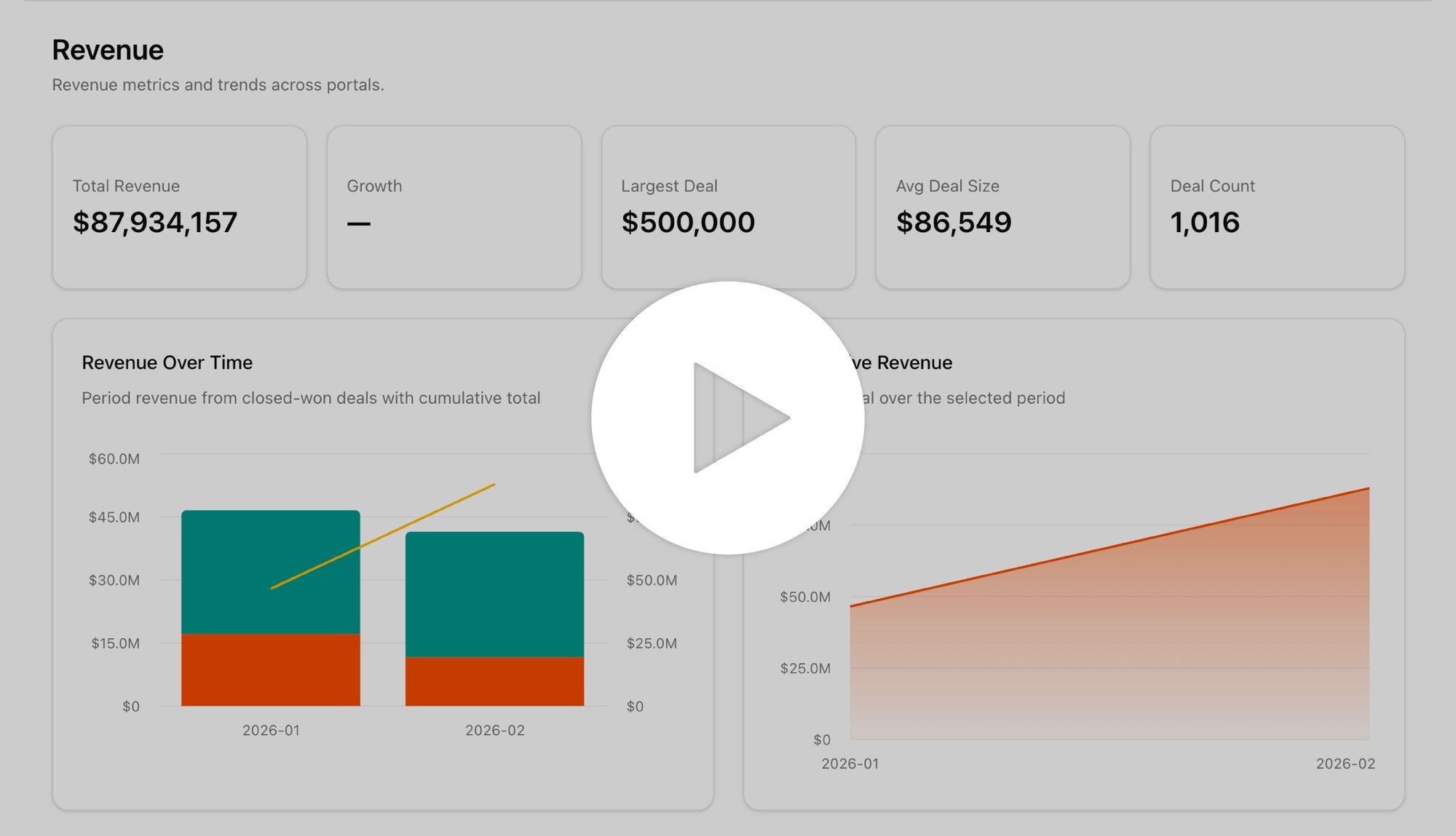
Revenue
Revenue analysis across your portfolio.
Charts:
- Revenue Over Time — Total closed revenue trended by your selected grouping
- Revenue by Portal — Bar chart comparing revenue contribution from each portal
- Revenue by Category — Revenue broken down by pipeline category (if configured)
Pipeline
Pipeline health and forecast for your portfolio.
Charts:
- Stage Distribution — Horizontal bar chart showing deal count and value at each pipeline stage
- Pipeline Forecast — Weighted pipeline value based on stage probabilities
- Weighted Value by Portal — Compare weighted pipeline across portfolio companies
Contacts
Contact lifecycle and lead source reporting.
Charts:
- Lifecycle Funnel — Funnel showing contacts progressing through your mapped lifecycle stages (MQL → SQL → Opportunity → Customer)
- Lead Source Breakdown — Pie/bar chart of contacts by original source
- Contacts Over Time — New contact creation trended over time
- Conversion Rates — Stage-to-stage conversion percentages
Lifecycle stage mappings are configured per portal in Settings → Lifecycle Stages.
Why It Matters
Aggreg8 gives organizations managing multiple HubSpot portals cross-environment visibility without operational complexity.
With one centralized view, leaders can:
- Quickly compare performance across environments
- Identify pipeline risks and revenue opportunities earlier
- Reduce time spent logging into multiple portals
- Streamline reporting and analysis
- Act on the data to solve bottlenecks quickly
Instead of gathering data manually, teams can focus on strategic decisions that drive growth.
Use Cases
Aggreg8 helps any organization managing multiple HubSpot portals understand performance across all of them without manually logging into each environment. The platform provides a centralized view of critical revenue and pipeline data, enabling faster analysis and reporting.
Common use cases include:
Multi-Portal Monitoring
Revenue & Pipeline Visibility
Monitor deal pipelines, revenue progress, and deal movement across all connected portals.
Lead & Contact Insights
Analyze lead generation and contact growth while identifying marketing and sales activity trends.
Flexible Account Selection
Select as many or as few portals as needed and customize dashboard views based on reporting needs.
Built by Aptitude 8
Aggreg8 was developed by Aptitude 8 to give organizations faster visibility into HubSpot data across multiple portals. With deep expertise in HubSpot architecture, integrations, and CRM strategy, Aptitude 8 designed Aggreg8 to surface the insights teams need without adding new data infrastructure.